
Under certain circumstances you may need to factory restore your Pocket Matcher due to repeated crashing or freezing. This will remove all data, applications and network settings so the handheld will need to be rebuilt by a member of the IMT Support team.
Please only factory restore a Pocket Matcher if a member of the IMT Support team has instructed you to do so.
How to perform a Factory Reset on a Dolphin Black WEH6.5 terminal.
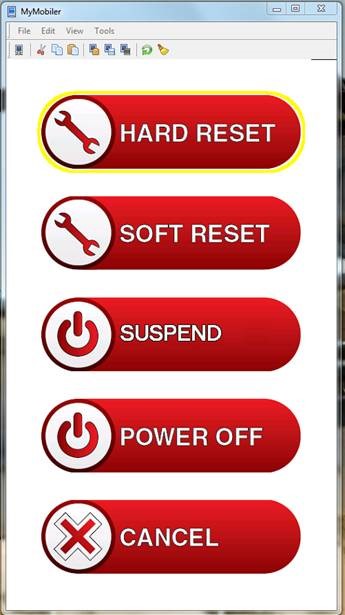
- Perform a Hard reset. Press and hold the power button on the top of the device until the display gives power down options. Tap hard reset.
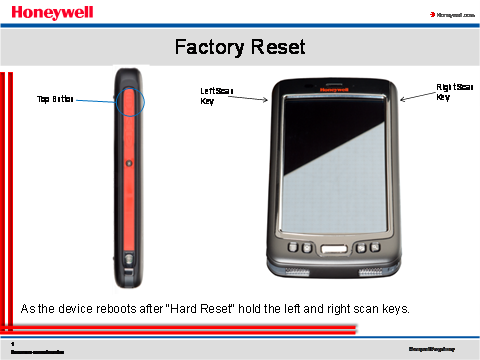
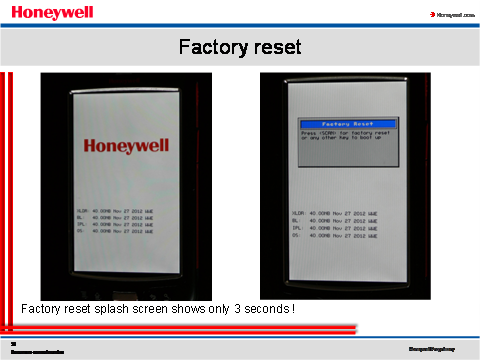
- While the Dolphin is booting, press and hold the left and right scan keys as shown in the picture below. Hold the buttons until the Honeywell Splash screen appears with the Factory reset box.
- NOTE: The Factory reset box is only visible for three seconds.
- Once the White Honeywell splash screen appears and the Factory reset box is in the center of the screen, press the phone key, disconnect key, then the home key.
- NOTE: The Factory Reset box is only visible for three seconds.
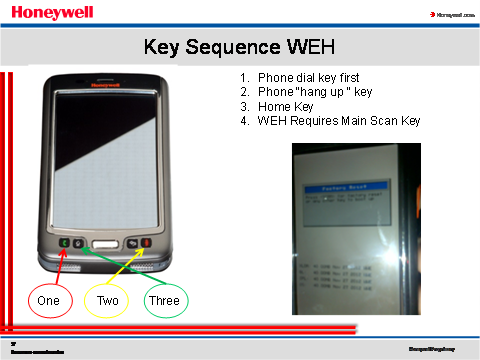
NOTE: These keys are pressed in sequence as they constitute the password to perform the Factory reset
Comments
0 comments
Article is closed for comments.