| Select the ‘Settings’ cog in the bottom right corner of the logon page, then select ‘Servers’ | 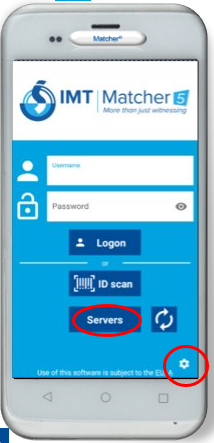 |
|
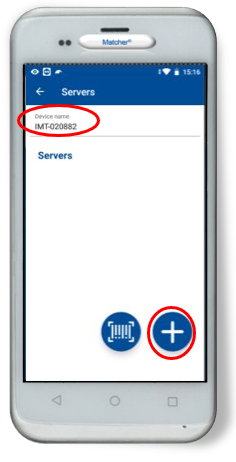
Check the ‘device name’ matches the asset tag on the back of the device. If there are no server details entered below, select the ‘+’ button to add a server |
 |
|
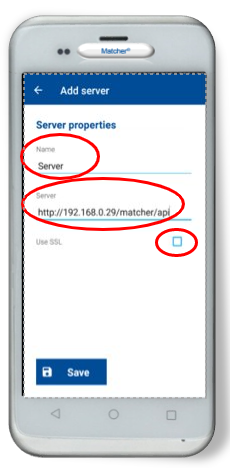
Enter the server details in the format http:// followed by either the IP address or hostname of the machine hosting the API, followed by /matcher/api – example shown. ‘Use SSL’ should not be selected unless specified by the customer’s IT department. Click ‘Save’, then the ‘Back’ button, and you should now be able to logon |
 |
v5.2.0 - Pocket Matcher - Configuring Pocket Matcher server settings

Comments
0 comments
Please sign in to leave a comment.