
- Once you have started the above procedure and submitted the witnessing
- If the barcodes match, the green message ‘Match confirmed’ will be displayed
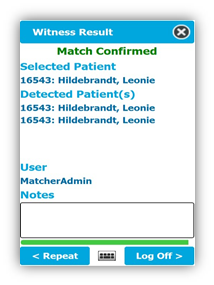
- You can ‘add notes’ if required
- The ‘<Repeat’ button can be selected if the same witness step needs to be repeated
- If the witnesses step does not match, the red message ‘No Match’ will be displayed and you will be asked to select a reason.
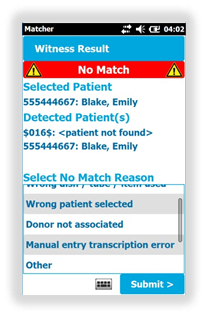
- You can also ‘add notes’ if required
- You can select ‘ < Retry’ to repeat the process and retry the reading of the barcode
- You will be asked to complete the witness stages of the process
- Once complete, ‘Log off >’
Comments
0 comments
Article is closed for comments.