

Matcher Version 4.7 – May 2018
Release Notes
Overview – what is this release for?
The main components of this release are:
- an update to the label sheets to use updated materials and incorporate an inbuilt alignment guide;
- a customisable header for the Patient Photo Album so that you can add some useful information for patients;
- an update to the Matcher service (used by the Pocket Matchers to save data to the Matcher database) to make it easier for IT teams to administer; and
- an improvement to the print time for unique barcodes.
There are also some smaller functionality enhancements and minor updates. These are all detailed below.
This is an update to the Matcher database, PC application, Pocket Matcher application and labels.
What is included in this release?
- Updated label sheets
- Customisable logo and headers for Patient Photo Album
- New cryo label layout
- New AVERY labels
- Enhancements to the NEXT button
- External patient search update
- Updated Matcher service
- Improved unique barcode label print speed
- Various small changes and updates
1. Updated labels
We have updated the label sheets as follows:
Cryo labels
We’ve made the white part of the labels ‘extra white’ to improve barcode readability. This extra whitening provides a greater contrast within the barcode, improving read rates and times.
We’ve also added some small circle labels for the top of PCR tubes. These are numbered with the corresponding item number for each PCR tube to help you identify the correct tube from the top when the tubes are sat in a tray. Note that you should still check and match the barcoded label as usual.
These new cryo labels are referenced LBL019 and will contain this reference at the top of the label sheet:
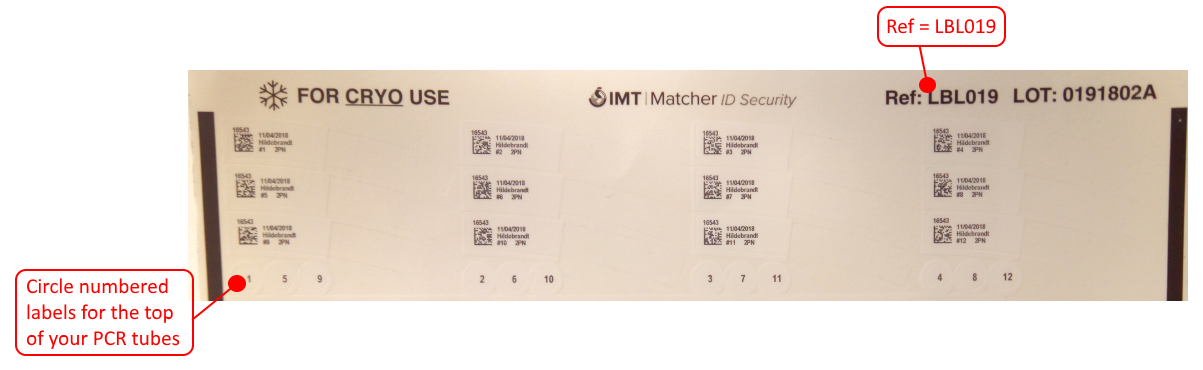
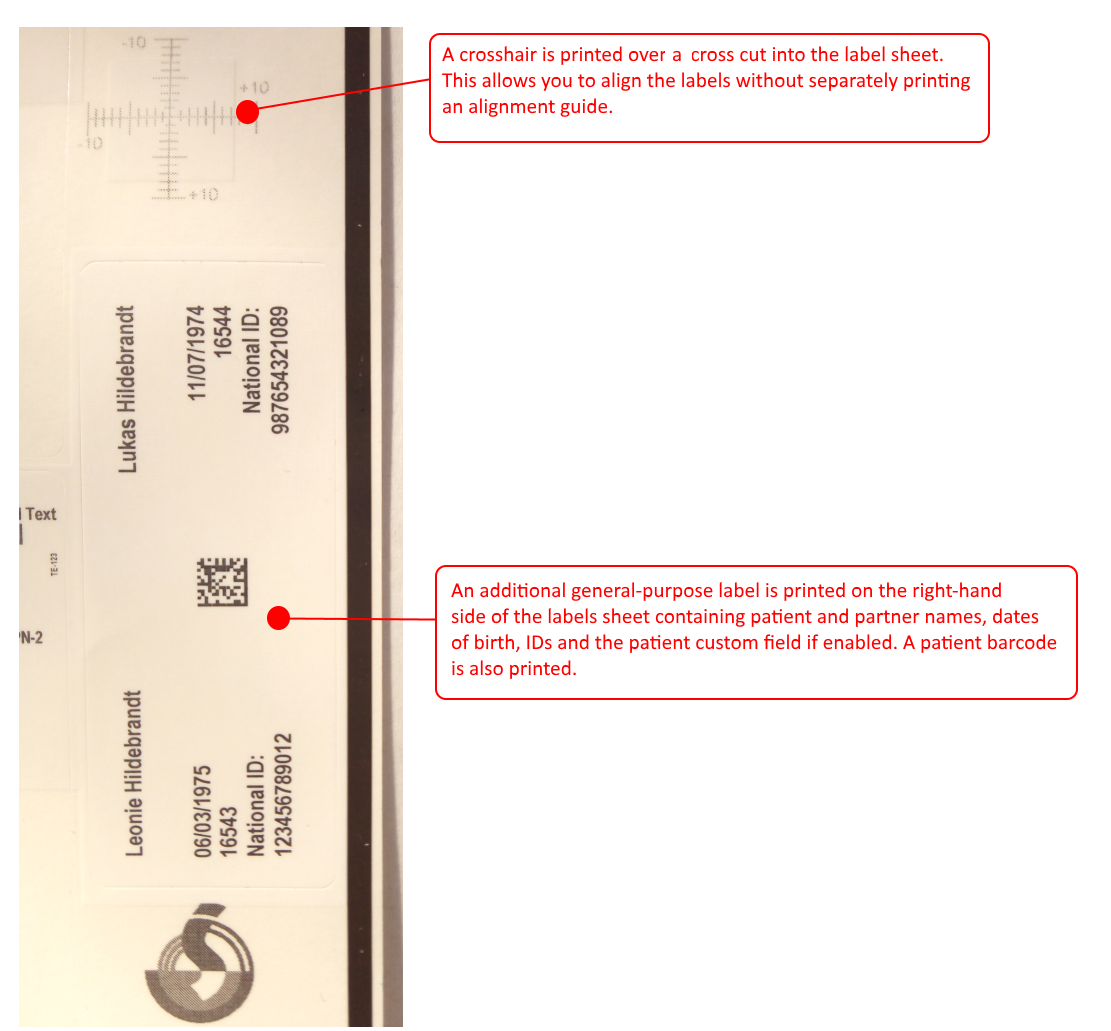
We have also added an inbuilt alignment guide. On the right hand side of the labels there is a cross cut into the label. Whenever you print a cryo label a crosshair guide will be overlaid onto this so that you can easily check and rectify alignment without having to print an alignment guide. There is also an additional label on the right side of the sheet.
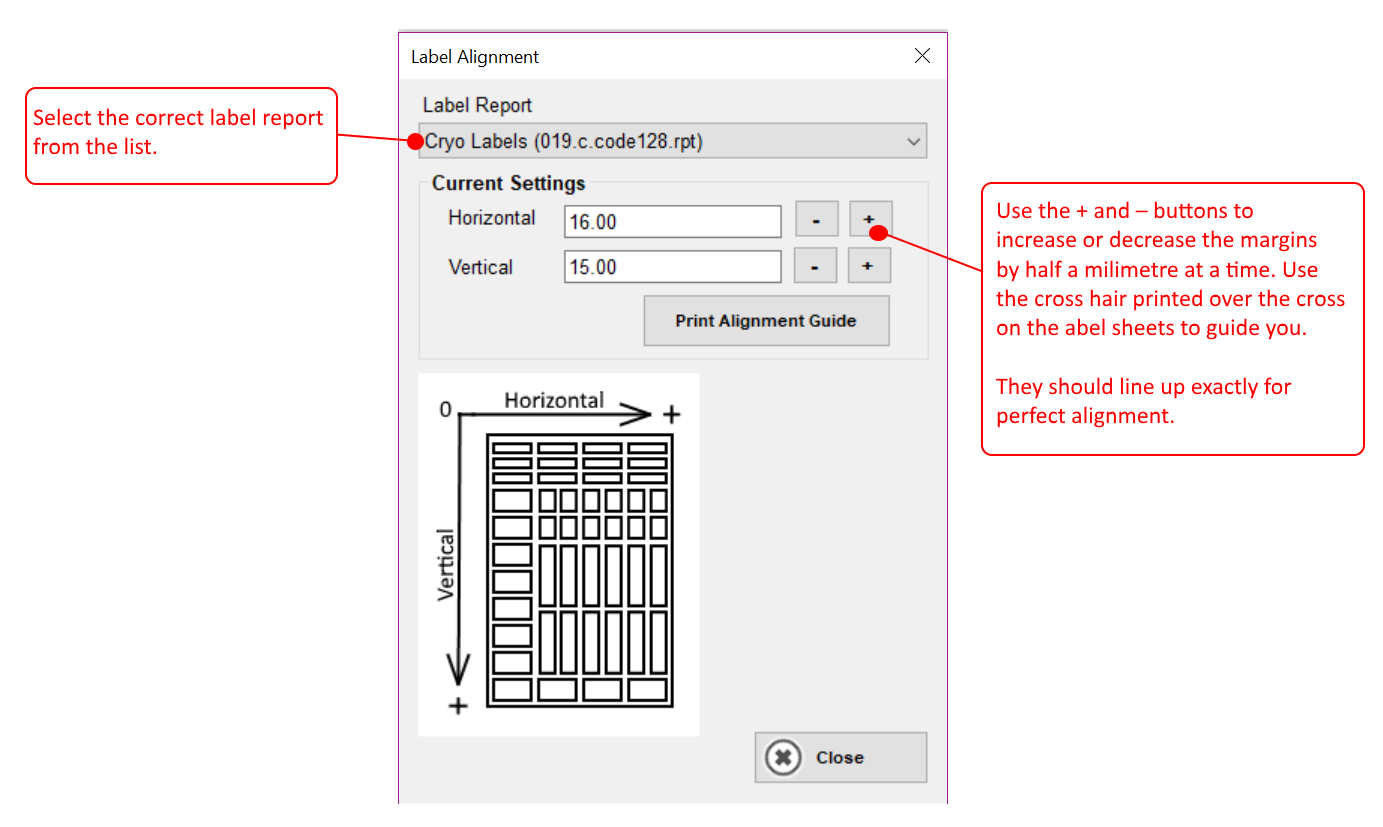
To adjust the alignment on the labels, click Tools > Label Alignment. The box below is then shown:
Non-cryo labels
We’ve made the white part of the labels ‘extra white’ to improve barcode readability. This extra whitening provides a greater contrast within the barcode, improving read rates and times.
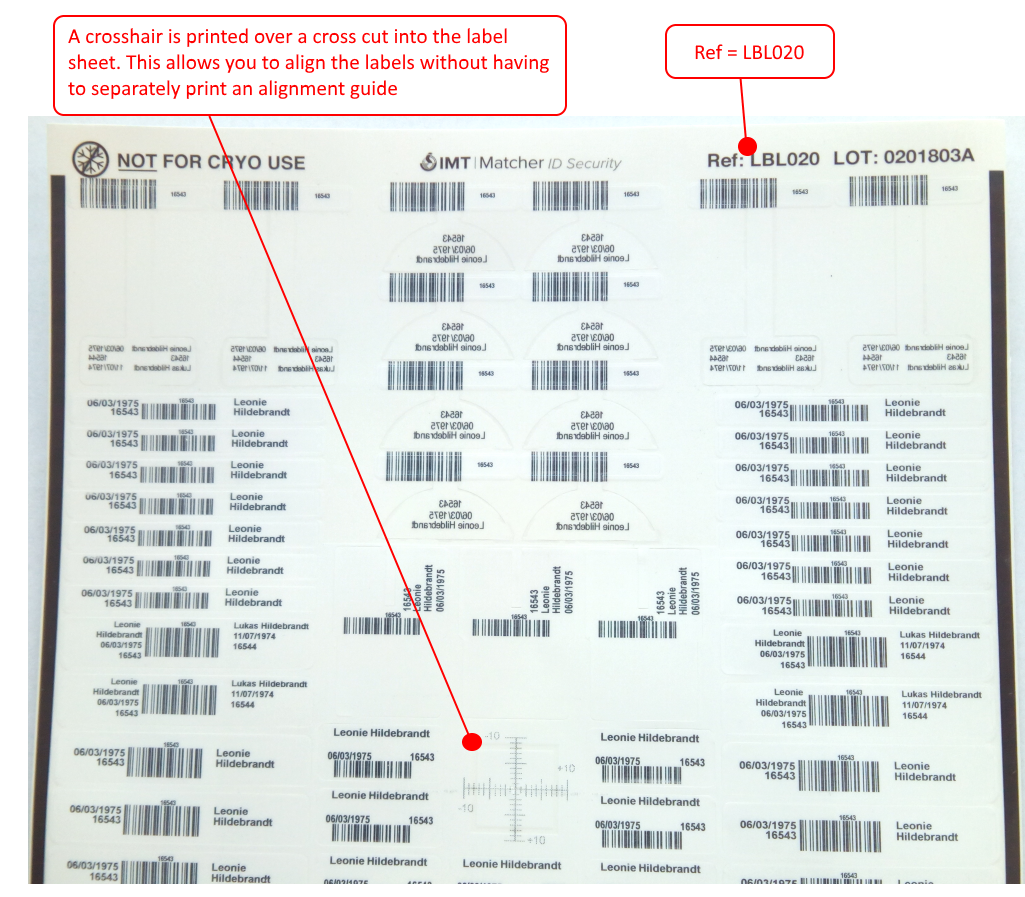
We have also added an inbuilt alignment guide. In the middle of the label sheet, there is a cross cut into the label. Whenever you print a label sheet, a crosshair guide will be overlaid onto this so that you can easily check and rectify alignment without having to separately print an alignment guide.
These new non-cryo labels are referenced 020 and will contain this reference at the top of the label sheet as shown on the next page.
2. Customisable logo and headers for Patient Photo Album
Based on feedback from clinics, we have updated the Patient Photo Album to include completely customisable headers. This means you can add information specific to your clinic and to the patient so that you can provide meaningful information to your patients about their treatment. It will also use your clinic logo (if you have one set up).
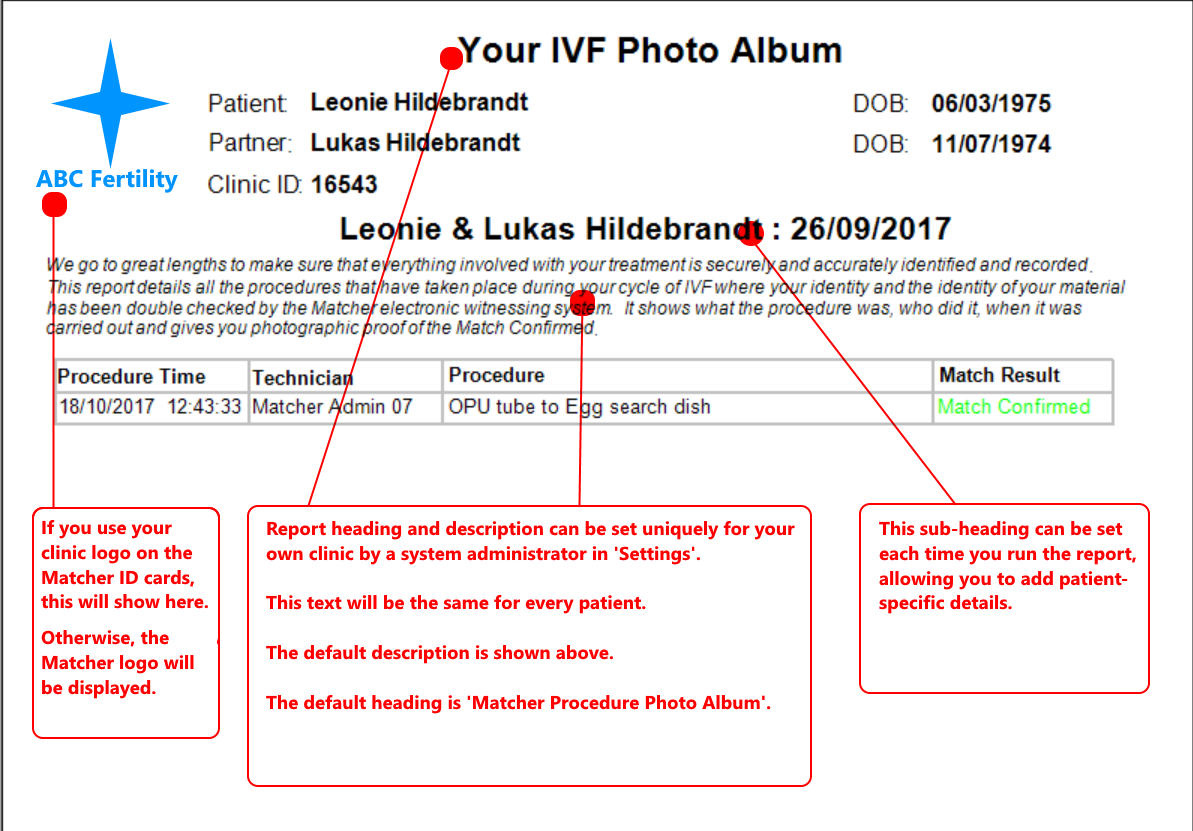
System administrators can update the Header and Description text by clicking Tools > Settings and updating the Procedure Photo Album Description and Procedure Photo Album Heading.
3. New cryo label layout
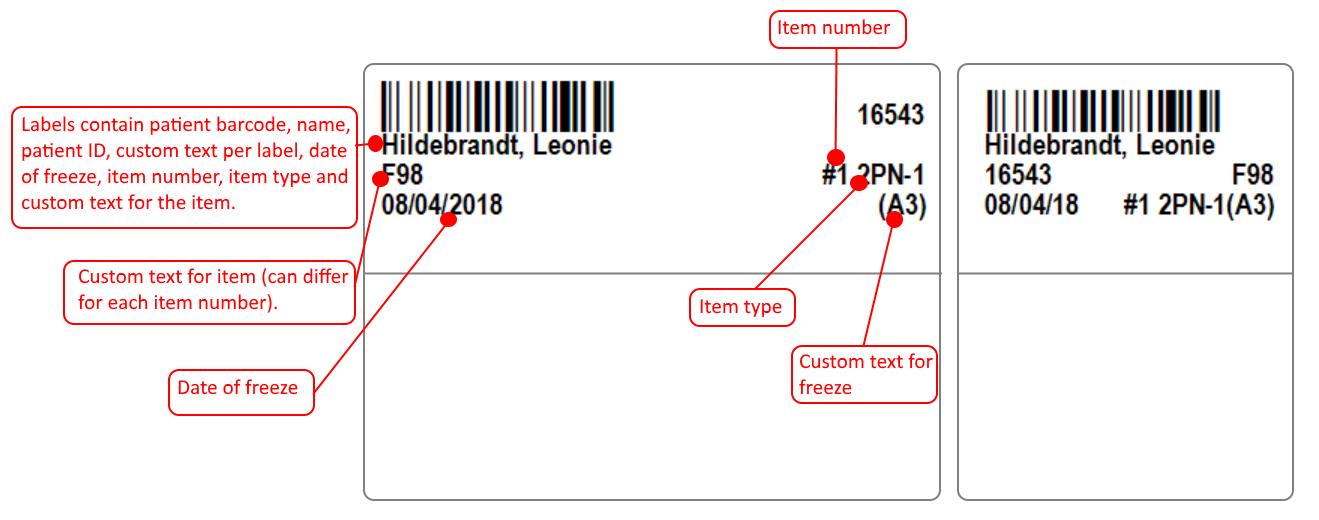
We have a new layout available for the cryo labels based on requests from clinics as shown below. When we upgrade you to 4.7, we will check with you whether you would like to change to this new layout or stay with the one you currently use.
4. New AVERY labels
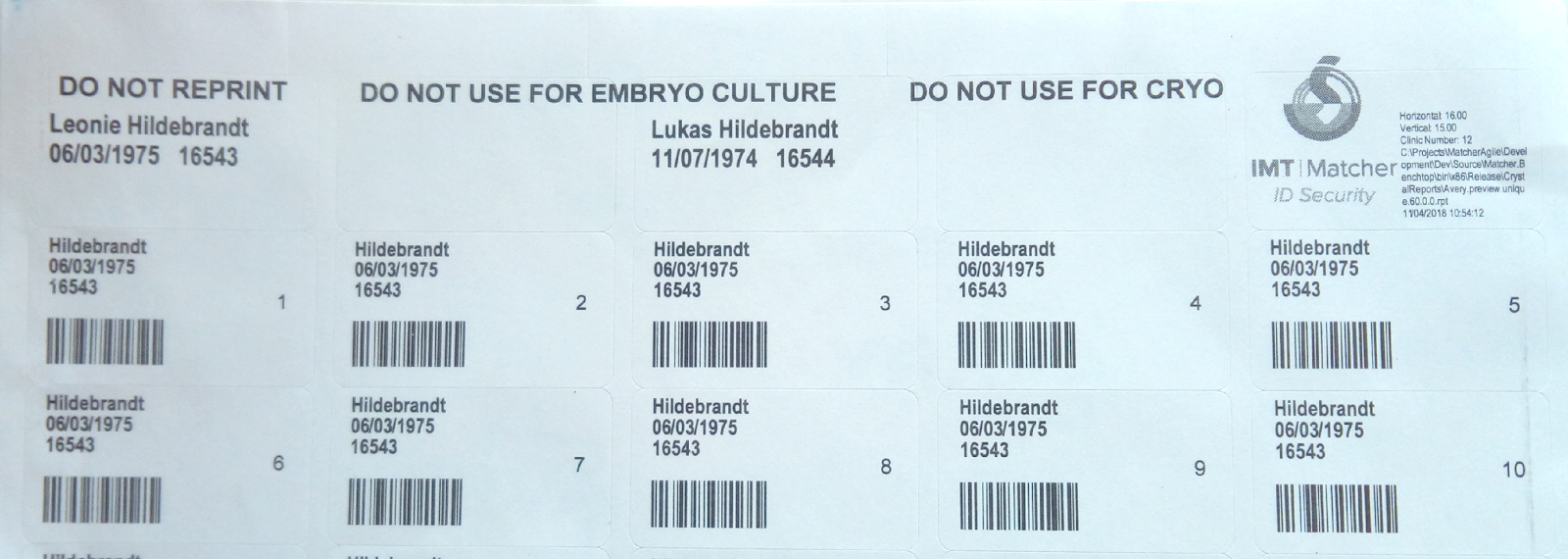
You can now print Matcher barcoded labels onto AVERY mini address labels (L7651-25). These can be printed directly or saved and emailed elsewhere to be printed.
These are ideal for satellite sites that are unable to have Matcher installed for some reason (e.g. IT infrastructure issues). For example, you can save a label sheet for a patient and email this to a satellite site. The satellite site could then print these labels and attach to patient samples. When these samples are sent back to the main clinic, they can be matched against standard Matcher labels.
5. Enhancements to the NEXT button
We had become aware that in certain circumstances, the NEXT button on the Pocket Matcher was not operating as expected and in some instances created duplicate process maps.
The NEXT button now operates consistently and will not create any additional process maps.
6. Updated the external patient search
We have updated the external patient search (where Matcher is linked to a separate patient management system or clinic database) to make it more configurable. This provides more options to optimise the search and ensure it works efficiently when dealing with very large numbers of patients.
7. Updated Matcher service
The Matcher service performs various ad hoc tasks, such as automatically ending cycles and also allows the Pocket Matchers to connect and save data to the Matcher database.
We have updated the way that this works to make it easier for IT teams to administer multiple sites.
8. Improved unique barcode label print speed
We’ve improved the print speed for uniquely barcoded label sheets so that they will print much quicker.
9. Various small changes and updates
We’ve made various other small changes and updates as follows:
- Updated the ‘No Match Report’ for consistency across all records.
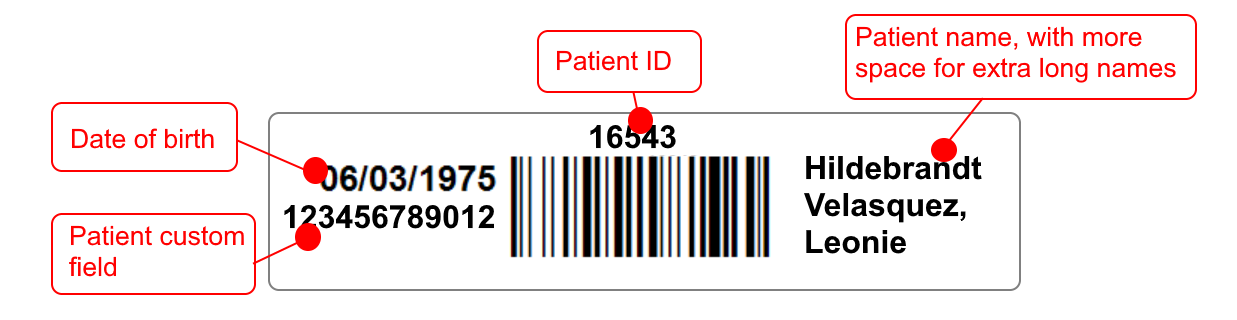
- We have added a variation to one of the non-cryo label layouts as follows. This will not be enabled unless you specifically request it.
- Various other very minor changes and functionality enhancements.
What do I need to do to implement this update?
Our Support Team will contact your IT Team to arrange installation / upgrade. This can now be done with our one-step installer making upgrades much quicker and easier.
What else do I need to do?
You do not need to do anything further. Our support team will check your upgrade options at the time of installation.
You can contact the Matcher Support Team on +44 (0)1829 771 327 or by email at matcher@imtinternational.com if you have any questions.
Documentation updates
The user guide, as well as the release notes, have been updated with this release. The user guide can be found by clicking Help > User Guide in Matcher; release documents can be found by clicking Help > Online Resources > Release Notes.
Are there any impacts or risks in applying this update?
- There should not be any disruption to your ongoing work during the upgrade, but access to each PC running the Matcher software will be required to perform the upgrade and user acceptance testing, during which it will be unavailable to use.
- This is a low risk change consisting of changes to the database, PC application, Pocket Matcher application, Matcher service and labels. A full database backup will be performed before the upgrade is implemented.
- In the unlikely event that the system upgrade causes any negative issues, the software can be rolled back to a previous version.
Quality assurance (QA)
These changes have been subject to IMT’s quality assurance process as follows:
- All system changes are logged, tracked and source controlled.
- System testing is completed throughout the development lifecycle to ensure changes have been completed as required.
- Full regression testing is completed to ensure changes have had no adverse impacts on other areas of functionality.
- Full internal ‘user acceptance testing’ is completed by members of the IMT team.
- Usability testing is incorporated into all stages of the QA process.
- Beta testing is completed by a limited number of Matcher customers at their sites with live data. This is normally one to three customers, who are selected based on the suitability of their workflows with the areas of affected functionality.
Further questions
If you have any questions on this release, please contact the Matcher Support Team on
+44 (0)1829 771 327 or email matcher@imtinternational.com.
Page of
Ref: Matcher v4.7 Release Notes
Comments
0 comments
Article is closed for comments.